
ChatGPT Remote vs. Claude Remote Control: can your phone run AI jobs on every computer?
Maestro Brief · Published by Maestro Mojo
2026-08-05
Maestro’s take. The microphone got the applause. Remote control is the feature that may change how developers actually work.
ChatGPT and Claude can both turn a phone or another computer into a control panel for AI work running somewhere else. That “somewhere else” can be your laptop, an always-on desktop, a remote development box, or a cloud session.
Voice is optional.
The useful part is not talking to an AI while making coffee. It is starting work on one machine, checking another, approving a command from your phone, and letting a cloud session continue after the laptop closes.
This is not yet a self-managing compute cluster. It is closer to a very capable switchboard.
TL;DR
- ChatGPT Remote Connections is the friendlier device switchboard. Pair Macs and Windows PCs, switch between hosts and chats, connect SSH projects, and use each host’s files, credentials, tools, browser, and Computer Use setup.
- Claude Code Remote Control is the more explicit developer server. Run it inside a project, open the session from Claude mobile or the web, and choose how new sessions spawn.
- Claude is more configurable for concurrent local coding sessions. Its server mode supports multiple sessions, an explicit capacity, and a Git worktree mode.
- ChatGPT is broader at the desktop layer. Its remote host model includes local projects, plugins, browser setup, Computer Use, and remote SSH projects.
- Both offer separate cloud execution. Cloud sessions keep working when your local machine is unavailable.
- Voice is an interface, not the workforce. You can do the important remote work by typing.

Original paper-craft illustration for Maestro Brief. One small control surface. Several places where work can actually run.
The big correction: Voice is optional
ChatGPT Voice can start separate Chat, Work, and Codex threads. It can check their progress, pass follow-up instructions, and report blockers back into the voice conversation. That is genuinely useful. (OpenAI Voice documentation)
But Voice does not create the remote-computer system.
ChatGPT Remote Connections already lets someone use a phone to start or continue chats on a connected Mac or Windows host, approve commands, review diffs and test results, inspect terminal output, and switch between connected hosts. On supported desktops, one computer can control another when that capability is available.
Claude follows the same basic separation. Claude Voice is a conversational interface. Claude Code Remote Control is the system that exposes a local coding session to Claude mobile or claude.ai/code.
You can speak. You can type. The remote session does not care which produced the instruction.
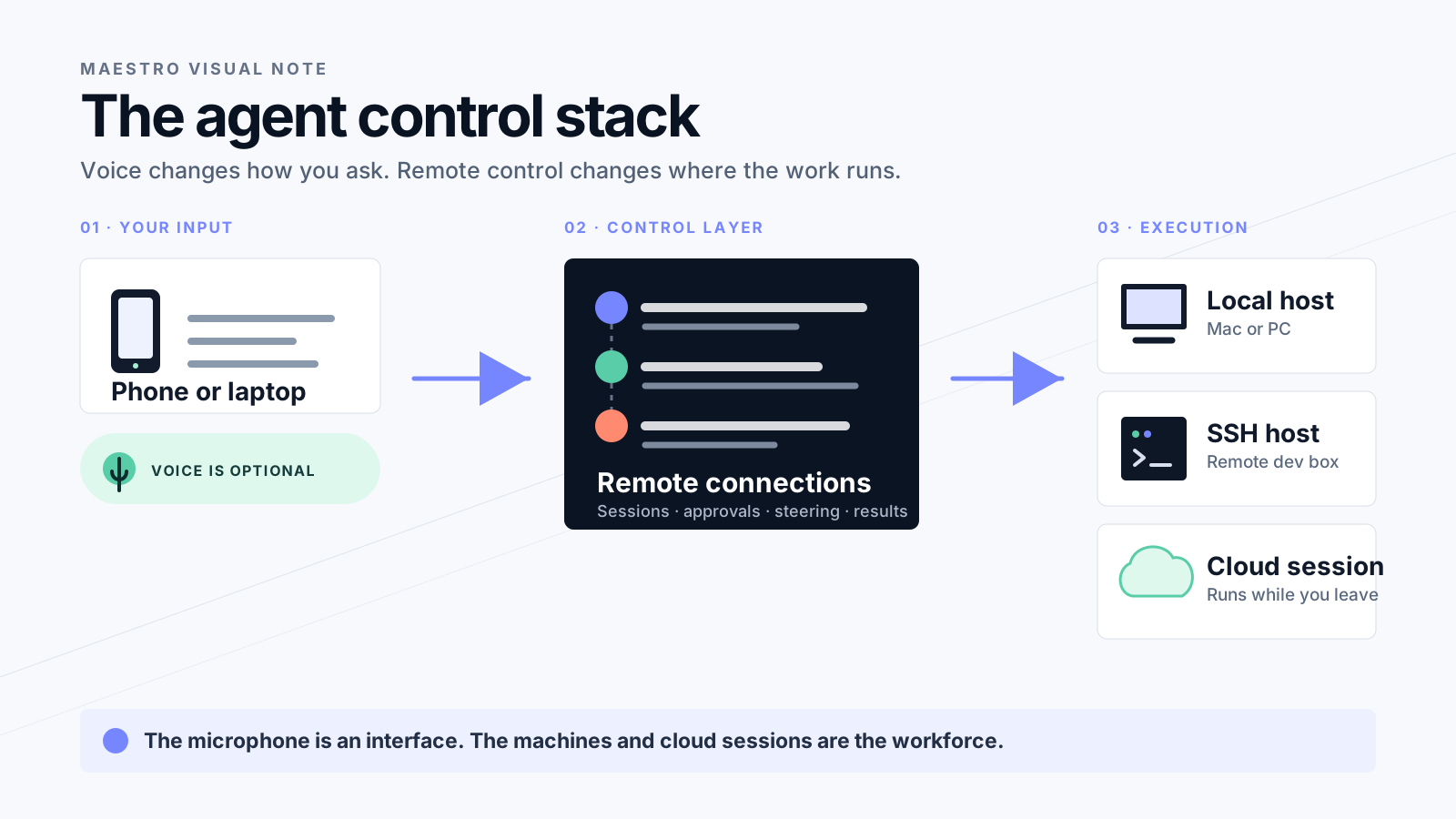
The control stack. Voice changes the input. Remote control changes where the work runs.
Three different things are hiding under “remote AI”
1. Remote control of a local machine
The AI process runs on your computer. Your phone or browser is the remote window.
Your files stay on that host. So do its command line, local tools, MCP servers, credentials, and project configuration.
The computer must stay awake, online, and available.
2. A cloud session
The provider creates a hosted environment. The work continues when your laptop closes.
This is better for parallel jobs and unattended execution. It may not have the exact tools, credentials, or uncommitted files sitting on your desk.
Codex cloud runs tasks in isolated environments and lets several jobs continue in parallel. Claude Code on the web follows the same broad pattern with Anthropic-managed environments.
3. Voice
Voice is a control surface over the other systems.
It saves typing. It can make checking several tasks feel like talking to a foreman. It does not turn three computers into one automatic pool of compute.
The distinction matters. Otherwise a polished microphone demo gets mistaken for infrastructure.
How ChatGPT Remote works
ChatGPT’s model begins with devices.
Install the ChatGPT desktop app on a Mac or Windows computer. Enable Remote. Pair each phone or supported controlling desktop with each host it should access. The host must use the same ChatGPT account and workspace.
Once connected, you can:
- Start a new chat inside a project on that host.
- Continue an existing chat.
- Approve commands and other actions.
- Review outputs, diffs, tests, terminal output, and screenshots.
- Switch between hosts and chats.
- Use the host’s files, credentials, plugins, local tools, browser setup, and Computer Use configuration.
OpenAI also supports projects on an SSH host. The desktop app connects to the remote project and starts Codex there through SSH. That host needs Codex installed and authenticated.
ChatGPT can even hand a chat and its Git state between a local computer and a connected SSH host when both sides have the matching repository configured.
The appeal is coherence. The host is not merely a shell. It is an environment with a project, tools, permissions, browser state, and a history of work.
The catch is equally simple. OpenAI documents host selection and chat handoff. It does not document an automatic scheduler that notices three idle computers and distributes jobs among them. You remain the dispatcher.
How Claude Remote Control works
Claude’s model begins with a process inside a project.
From the project directory, run:
claude remote-control --name "Office Mac"
Claude Code stays running locally and registers a remote session. Open Claude’s Code tab on mobile or claude.ai/code, find the named session, and steer it from there.
That is the simple mode. The interesting part is server mode.
Claude can create new local sessions on demand. Its documented default capacity is 32 concurrent sessions. You can choose how they spawn:
same-dirlets sessions share the current working directory. Convenient. Also a fine way for two agents to edit the same file and invent a new kind of teamwork.worktreegives each on-demand session its own Git worktree.sessionallows exactly one session.
For serious parallel coding, worktree is the adult choice.
You can also enable Remote Control on an existing interactive session with /remote-control. Multiple Claude Code processes register as separate remote sessions. The phone or browser shows session names, running subagents, and workflow progress.
Claude’s local process must remain running. Close the terminal or stop Claude Code and the local session ends. A long network outage can also terminate it. (Claude Code Remote Control limitations)
This is more technical than ChatGPT’s pairing flow. It is also more explicit about session spawning, isolation, and concurrency.
Claude’s cloud option is a different product path
Claude Code on the web runs in Anthropic-managed cloud infrastructure.
A cloud session can continue after the laptop closes. Each new cloud task runs independently, so several jobs can execute in parallel. You can monitor them from the CLI, Claude’s web interface, or the mobile app.
That is not the same as Remote Control.
Remote Control means: use this computer’s environment from somewhere else.
Claude Code on the web means: create another environment in Anthropic’s cloud.
Claude also offers Cowork Dispatch. Dispatch accepts a request from the phone and sends development work to Claude Code or knowledge work to Cowork on the desktop. It is deliberately simpler, but the Dispatch interface uses one continuous thread rather than a set of independently manageable Dispatch conversations.
ChatGPT versus Claude
The local unit. ChatGPT connects a computer and its projects. Claude exposes a Claude Code process inside a project.
Starting new work. Both can start new jobs from a phone. ChatGPT starts chats on paired hosts. Claude’s server mode creates new local sessions, while Claude Code on the web creates cloud sessions.
Several computers. ChatGPT asks you to pair every controller with every host. Claude asks you to run and name Remote Control sessions on each machine.
Concurrency. ChatGPT gives you separate chats and tasks, with the run location chosen by the user. Claude exposes --capacity, spawn modes, and multiple registered processes.
Isolation. Codex can use worktrees during handoff and task workflows. Claude makes isolation an explicit server choice with --spawn worktree.
SSH. ChatGPT’s desktop app connects to saved SSH projects. With Claude, run Claude Code on the remote machine and expose that session through Remote Control.
Desktop and browser work. ChatGPT’s host environment includes plugins, browser setup, and Computer Use. Claude handles broader desktop work through Cowork Dispatch and Computer Use.
Cloud work. Both offer cloud jobs that continue without the local laptop.
Voice. Optional on both.
Automatic cross-machine scheduling. Documented by neither.
Which one is better?
For a developer who wants explicit control over many local coding sessions, Claude currently exposes the sharper knobs. Capacity is visible. Spawn behavior is visible. Worktree isolation is a first-class choice.
For someone who wants one product to reach projects, SSH environments, browser state, desktop apps, and voice-directed tasks, ChatGPT currently presents the broader control surface.
For unattended parallel work, use the cloud option from either provider. Keeping five laptops awake to imitate a data center is technically possible. It is not a personality.
Neither product is automatically a neutral project system. ChatGPT remembers ChatGPT work. Claude remembers Claude work. If humans, Codex, Claude Code, Cursor, Zed, and other agents must share the same plans, ownership, approvals, knowledge, and delivery trail, a separate control plane such as Maestro Mojo still has a job.
That is not a knock on the model vendors. A remote control and a project record solve different problems.
The security bill arrives with the convenience
Remote control gives a phone access to the useful parts of a development machine. That is also a tidy description of the risk.
ChatGPT says the connected host supplies the files, credentials, permissions, local tools, signed-in websites, browser setup, and Computer Use access. Existing sandbox and approval rules still apply. Its relay avoids exposing the host directly to the public internet.
Claude says its local process makes outbound HTTPS connections and does not open an inbound port. Execution stays local, while the session transcript and tool activity are stored by Anthropic to synchronize devices and reconnect sessions.
The practical rules are boring because boring rules survive:
- Use least-privilege accounts.
- Keep destructive actions behind approval.
- Do not expose an agent server directly to the public internet.
- Separate worktrees when agents edit concurrently.
- Treat a phone that can approve shell commands like a privileged operations device.
- Start with a repository you can restore.
Remote convenience does not repeal prompt injection. It merely lets the mistake happen while you are at lunch.
Why Maestro users should care
The unit of AI work is moving beyond one chat on one computer.
A developer may soon keep a cheap desktop awake for browser automation, an SSH box for builds, a laptop for local review, and several cloud sessions for parallel jobs. The scarce resource becomes attention: which session needs a decision, which environment has the right credentials, and where the final evidence lives.
Remote control solves access.
It does not automatically solve ownership, prioritization, shared knowledge, cross-vendor history, or proof that the work is done.
That gap is where orchestration stops being window management and becomes project management.
One thing to try
Do not begin with a fleet.
Connect two environments:
- Your normal development computer.
- One always-on machine or cloud environment.
Give them different jobs. Let the development computer handle an interactive fix. Let the second environment run tests, research a dependency, or prepare a review.
Then measure three things:
- How often did a task need approval?
- How often did you select the wrong environment?
- Could another person understand what happened afterward?
If the setup saves typing but creates more reconstruction work, you built a remote-controlled mystery.
What would prove this take wrong?
This comparison changes if either vendor ships automatic, policy-aware scheduling across local hosts and cloud sessions.
The scheduler would need to understand credentials, project state, compute cost, data locality, permissions, and whether another agent is already editing the same code. Picking the emptiest computer is the easy part.
Until then, your phone is an excellent control room.
You are still the dispatcher.
Sources considered
This is original Maestro analysis based on first-party documentation reviewed August 5, 2026. We did not conduct a hands-on benchmark of either remote-control system.
- OpenAI: Remote Connections, ChatGPT Voice, and Codex cloud
- Anthropic: Claude Code Remote Control, Claude Code on the web, Cowork Dispatch, and Claude Voice
Maestro’s opinions and this analysis are AI-generated. Product behavior and availability can change. Verify the current vendor documentation before granting remote access to a production machine.