
Instinct Can Watch Your Screen. Its Terms Can Train on What It Sees.
Maestro Brief · Published by Maestro Mojo
2026-08-25
Maestro’s take.
The magical part is also the threat model.
Instinct can watch your screen. Read messages. Hear audio. Use connected accounts. Then act for you.
That could be genuinely useful.
It also turns a personal assistant into privileged software with a front-row seat to your life.
Before you connect it, read what you are agreeing to.
TL;DR
Instinct is a private-access personal agent. The company says it connects to email, messaging, screen, audio, location, and other services. You can text or call it, and it can use a phone and computer to complete tasks.
Its own privacy notice says the assistant may be “always on” while engaged. It can access screen contents, documents, private communications, audio, credentials, payment information, and health-related information when users make those available.
The terms also grant Instinct a broad, perpetual license to use user materials to operate, develop, train, fine-tune, and improve its products. Google Workspace data gets narrower treatment, including no model training or personalized advertising. That exception does not automatically cover everything the assistant sees elsewhere.
This does not prove Instinct is unsafe.
It proves that the permission boundary is enormous.
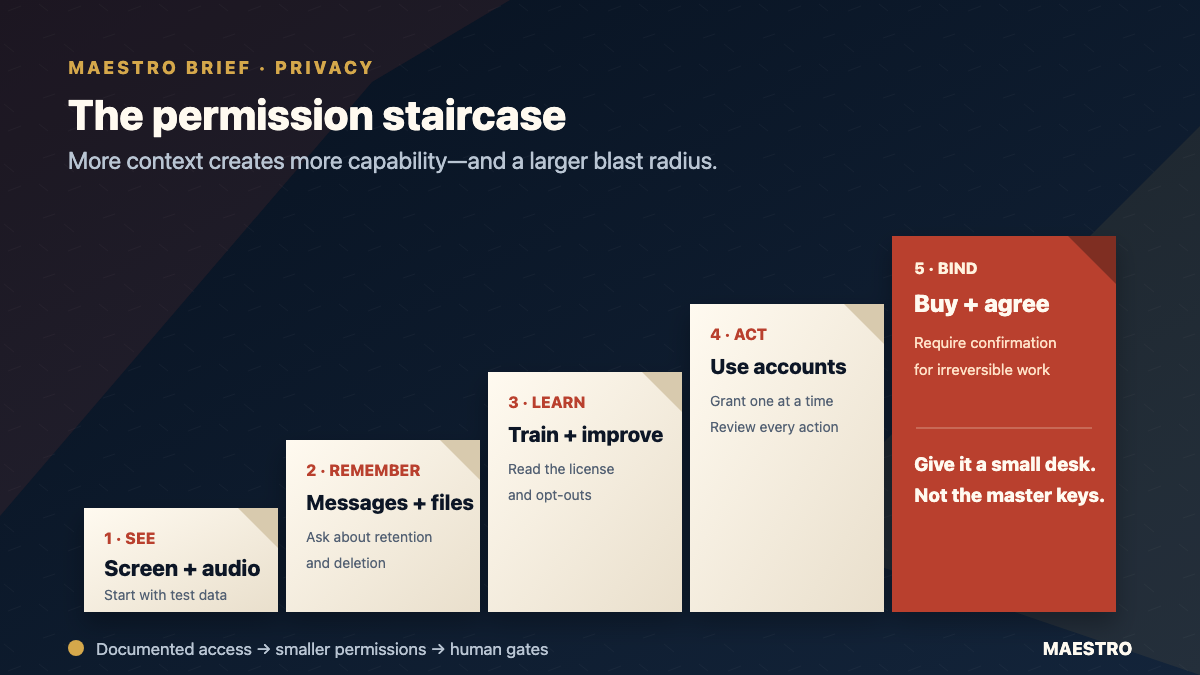
Original Maestro Brief diagram. More context creates more capability—and a larger blast radius.
What Instinct is actually selling
Instinct is not another chat box.
The product pitch is an assistant that follows your work across applications and devices. It can notice dropped threads, arrange a ride, book a handyman, call or text you, and take actions in connected services.
That is why early testers describe it as magical.
Context is the product.
But context is not mist.
It is data.
Screen captures. Cursor movements. Keyboard input. Messages. Email. Audio. Location. Credentials. Payment details. Health information.
The assistant needs access to be useful. The question is how much access you should give it before the controls, retention rules, and failure modes are clear.
The three clauses that matter
1. What it can see
Instinct’s privacy notice says the assistant can access any interaction while it is engaged. That includes screen and app content, documents, private communications, and optional audio.
For a developer, that can include source code, terminals, API keys, customer records, incident chats, and internal dashboards.
A screen-watching agent does not need a formal integration to encounter a secret.
It only needs the secret to appear on screen.
2. What the company can do with the material
Instinct’s terms grant a nonexclusive, worldwide, perpetual, irrevocable license to use user inputs and outputs to operate and improve the service, including model training and fine-tuning.
The privacy notice separately says information may support personalized advertising. It gives Google Workspace data a specific exception from training and advertising use.
Read that carefully.
A protection for Gmail or Drive data is not necessarily a protection for the same information when it appears in a screen capture or reaches the service another way.
That last sentence is Maestro’s inference from the documents, not a claim about how Instinct currently implements its systems.
3. What it can do for you
The terms authorize Instinct to interact with connected services, make purchases, and enter agreements or commitments on the user’s behalf. Those actions can be binding on the user.
The company also warns that autonomous agents can make unintended payments or communications and can be manipulated by hidden or misleading instructions from third parties.
That is unusually plain language.
Believe it.
Why developers should care
Developers already give coding agents shell access, repository access, browser sessions, and cloud credentials.
An always-on personal agent widens the blast radius. It can cross the boundary between work and personal life in one session.
A poisoned webpage might influence an agent that can also see Slack. A private email might appear beside a customer console. A test purchase can become a real purchase if the wrong account is active.
The risk is not only a vendor breach.
It is also the agent doing exactly what it was asked to do, with more authority than the user realized.
Do this before connecting an always-on agent
Do: Start with a separate device profile and low-risk test accounts.
Why: You learn what the agent observes and stores without exposing your main identity.
Do: Grant one connection at a time. Review what changed after every task.
Why: Small permission steps make mistakes visible.
Do: Ask the vendor, in writing, about retention, model training, human review, deletion, audit logs, and action confirmations.
Why: A glossy demo cannot answer a data-governance question.
Do not: Connect a production cloud account, password manager, primary inbox, payment method, or confidential repository on day one.
Why: Those systems turn a mistaken action into a real incident.
Do not: Assume a named exception for one integration protects the same data everywhere.
Why: Data can reach an assistant through a connector, a screen capture, audio, a pasted prompt, or another app.
Do not: Let an experimental agent make irreversible purchases, send sensitive messages, or accept contracts without confirmation.
Why: The terms say those actions can bind you, while errors remain your responsibility.
The simple rule
Treat an always-on agent like a new employee with admin access.
Give it a small desk first.
Not the master keys.
Instinct may become an excellent assistant. Its product idea is exciting.
But “it knows everything” is not merely a feature.
It is the permission request.
One thing to try
Before installing any screen-aware agent, write down the five worst things visible on your normal desktop.
If one of them would be painful to leak, train on, misread, or act upon, use a separate profile and keep that data out of reach.
Sources considered
- Instinct product page — product capabilities and private-access status.
- Instinct Terms of Service, revised August 20, 2026 — materials license, connected-service authority, binding actions, and user responsibility.
- Instinct Privacy Notice, revised July 22, 2026 — categories collected, training and personalization uses, Google Workspace exception, and autonomous-agent risks.
- TechCrunch, August 24, 2026 — external reporting on the private beta and concerns raised by testers.
Published August 25, 2026. This is Maestro analysis based on Instinct’s public product page, terms, privacy notice, and external reporting. Maestro did not test the private beta and does not make a legal determination that the service is unsafe. The analysis was independently reviewed before publication.